Modern Salesforce Integrations: Why External Credentials + Named Credentials Are Now Essential


Get Expert Salesforce, Traction Rec and Litify Support
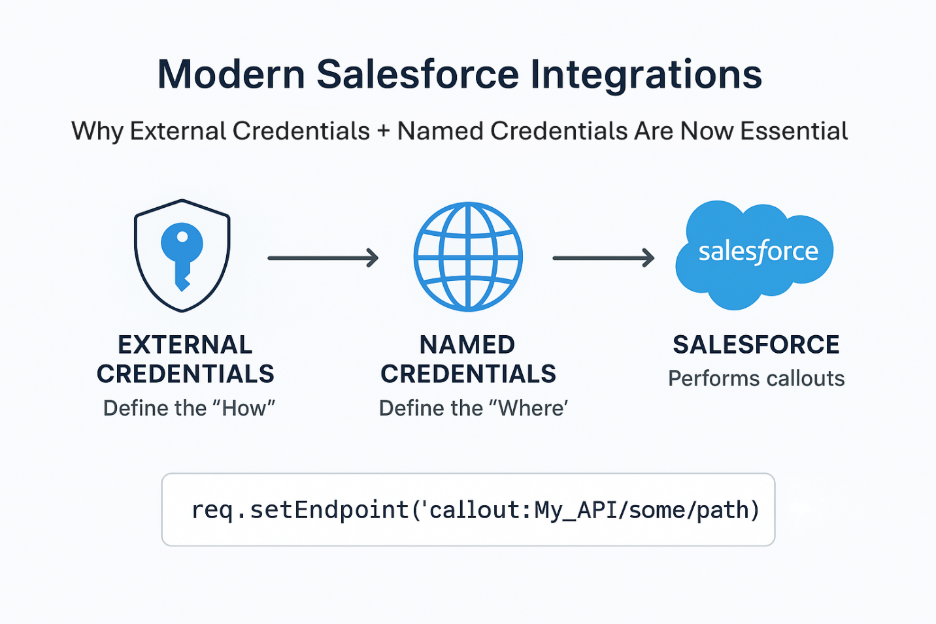
Salesforce integrations are everywhere now. Whether you're pulling data from sales intelligence tools, enriching records with third-party APIs, or connecting to authentication services, you need a way to securely manage API keys, OAuth tokens, certificates, endpoints, and custom headers.
For years, developers hardcoded this stuff directly in Apex. It worked, but it was a messy process. Secrets lived in code. Endpoints changed between sandboxes and production. The token refresh logic was copied across projects. And every time something needed updating, you touched code that shouldn't need to be touched.
Salesforce’s modern architecture solves these challenges with a two-layer authentication model:
- External Credentials → define how Salesforce authenticates
- Named Credentials → define where calls go and which External Credential they use
Together, they create a secure, maintainable pattern that should be the default for every integration you build.
1. External Credentials: Define the “How”
External Credentials encapsulate the authentication model for an integration, including:
- API keys and secrets
- OAuth 2.0 (client credentials, authorization code, JWT, etc.)
- Certificates / Mutual TLS
- Principal types (Named Principal or Per-User Principal)
- Sensitive parameters stored securely
The key benefit: Salesforce manages authentication automatically—without exposing secrets in Apex, metadata, or version control.
It is the modern, recommended alternative to custom token storage or passing sensitive data in code.
2. Named Credentials: Define the “Where”
A Named Credential defines:
- The external service endpoint (base URL)
- Which External Credential to use
- Optional fixed headers
- Whether Salesforce should automatically include authentication headers
This separation of authentication (External Credential) from endpoint configuration (Named Credential) eliminates hard-coded URLs and secrets.
Apex callouts then become as simple as:
req.setEndpoint('callout:My_API/some/path');
No secrets, no environment-specific strings, no token management.
3. Why This Approach Wins Every Time
Security First – Your secrets stay encrypted, scoped, and completely out of Apex or metadata. No accidental leaks, no risky shortcuts.
Code That Breathes – Forget boilerplate auth logic. Salesforce injects tokens and headers for you, so your code focuses on what matters: business logic.
Environment-Friendly – Sandbox, staging, production? Each gets its own endpoint without duplicating authentication rules. Smooth transitions, zero headaches.
Team-Friendly – Admins handle authentication; developers stay laser-focused on building features. Everyone works in their lane.
Any Auth, Any Time – API keys, Basic Auth, OAuth, JWT, AWS SigV4, Mutual TLS, custom flows—you name it, this model supports it.
Deployment Made Simple – Secrets never touch source control. Populate them post-deployment via Setup or the Connect REST API, and you’re good to go.
4. Real-World Examples
These examples are based on integrations we've built for clients using Cognism, Apollo, and TheirStack.
Example 1: API Key Authentication (e.g., Cognism)
External Credential
- Stores API key securely
- Uses Named Principal
- Handles authorization header injection automatically
Named Credential
- Defines base URL
- References the External Credential
Apex Callout
No API key handling required—Salesforce adds the header for you.
Example 2: OAuth 2.0 Client Credentials (e.g., Apollo)
External Credential
- Uses OAuth 2.0 client credentials flow
- Stores client ID, secret, token endpoint
- Salesforce retrieves & refreshes access tokens automatically
Named Credential
- Contains the service’s base URL
- Points to the OAuth 2.0 External Credential
Apex Callout
No token management or refresh logic—Salesforce handles it.
5. Best Practices
- Always use External Credentials + Named Credentials together
- Store secrets only in External Credentials
- Separate authentication configuration from endpoint configuration
- Use dedicated Named Credentials for each environment (sandbox, QA, production)
- Prefer Named Principal for system-to-system integrations
- Use Per-User only when end-user identity matters
- Allow Salesforce to manage OAuth token lifecycles—avoid custom refresh logic
- Never store secrets in Custom Settings or Custom Metadata
- Populate sensitive parameters post-deployment via Setup or the Connect REST API
Summary
Salesforce’s modern integration framework—External Credentials + Named Credentials—provides a secure, scalable, and low-maintenance approach for all API callouts. This architecture:
- Keeps secrets out of Apex
- Simplifies authentication
- Supports any auth method
- Improves deployment safety
- Reduces code complexity
- Enhances governance and auditability
Our recent projects (Cognism, Apollo, TheirStack) demonstrate how this design delivers real-world value and why it should be the default pattern for all new Salesforce integrations.
If you're building integrations that still hardcode credentials or manage tokens manually, it's time to modernize. The framework is there. The benefits are immediate. And your future self will thank you.
Continue Reading
%20(2).png)


Transform What’s Possible With
Salesforce
Traction Rec
Litify
Salesforce
Unlock the full potential of your platforms and make the impossible a reality with ECHO Technology Solutions.


