Automating Contract Management: What We Learned Implementing airSlate

Get Expert Salesforce, Traction Rec and Litify Support
Before airSlate, managing contracts required multiple manual steps and manual data entry, making the process slow and tracking document status challenging.
Compared to our previous tool, airSlate provides an all-in-one platform where document creation, workflow automation, and digital signatures are handled seamlessly in a single system. It allows us to design complex workflows visually without coding, making it easier to adapt processes as our business evolves. airSlate also integrates with tools we already use, like Salesforce and email platforms, reducing manual data entry and minimizing errors. With real-time document tracking, we can monitor progress more effectively and make faster, informed decisions. By automating repetitive tasks, airSlate helps us save time and resources while streamlining operations. Overall, it enables us to manage our processes in a faster, safer, and more efficient way.
airSlate brings several key improvements to how we manage documents:
- Familiar workflows that just make sense
airSlate’s logic is like what we already know from Salesforce, so everything feels intuitive right from the start.
- Smart flexibility when it comes to recipients
With airSlate, documents can be sent directly to contacts from Salesforce or to any email entered manually, giving flexibility while reducing errors.
- eSign documents on any device
airSlate allows you to sign documents securely from any device, making it easy for teams and clients on the go.
- More ways to take action
We can preview documents before sending them, export them directly to SharePoint or Salesforce, or share them through other preferred channels.
- A clean, modern interface that makes work easier
Everything is clearer and better organized, giving us instant visibility into where each document stands in the process.
- Monitor every step, anytime
airSlate allows you to track every document in real time and generate detailed reports, giving full visibility into your workflow and helping teams stay on top of every step."
How We Did It (Technical Overview)
Implementation had three phases.
First, we connected airSlate to Salesforce through the AppExchange managed package, making sure authentication was secure and users were mapped to the right roles. Then, we added a custom button on the Contract object, so with a single click, the system pulls all the relevant data in real time and generates the document automatically. Finally, we set up dynamic routing and eSignature steps, allowing documents to go directly to the Salesforce contact, any manually entered email, or multiple recipients in sequence or parallel.
Triggering Automation from a Button
Once the integration was in place, we moved on to creating a simple way for users to launch automations directly from Salesforce.
- Created a custom button on the Contract object in Salesforce.
- This button passes the record ID to an airSlate Workflow through a URL parameter.
- The Flow uses that ID to pull related field values (e.g., contact info, contract amount, dates) in real time.
Routing & eSignature
To achieve a fully automated workflow, we configured dynamic routing rules and eSignature steps within airSlate SignNow.
- Configured dynamic recipient rules so documents can be sent to:
- The primary contact on the record,
- A manually entered email, or
- Multiple recipients in parallel or sequence.
- Set up eSignature steps using airSlate’s native signing component – airSlate SignNow.
Fields Updates in Salesforce
airSlate bots were configured to send updated field values back to Salesforce.
- airSlate bots to push field updates back in Salesforce.
- Used for test record creation in Salesforce for Account, Contact, and Opportunity.
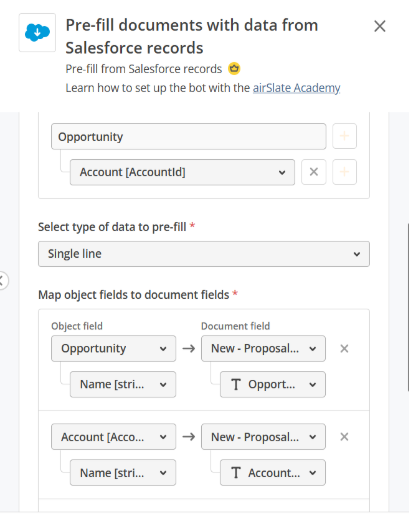
With the previous tool we used, only one field could be updated; on the other hand, airSlate can create and update records on main and related objects with static values or values from the document.
Previous tool field mapping:

airSlate Mapping:
Templates
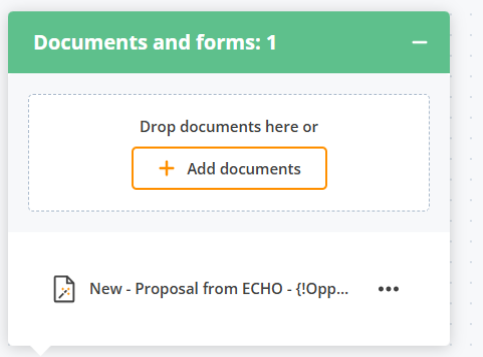
- When it comes to templates, instead of relying on Template IDs in an external application, airSlate allows for simple upload, editing, and management directly within the platform.
Export Option
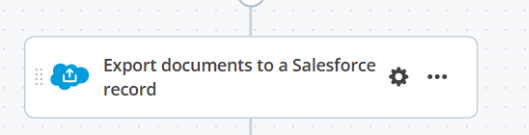
- airSlate provides a convenient export option, where we can choose to export only the signed document, only the certificate, or both together. In other tools we used, export was automatic and couldn't be configured.
Ready to Transform Your Contract Process?
If this resonates and you're tired of manual contract workflows slowing down your team, we can help. Whether you already know you want airSlate or you're just exploring options to streamline document management, we've been there.
We'll walk you through:
- Assessing whether airSlate fits your specific workflows
- Planning an implementation that minimizes disruption
- Configuring integration with your existing systems (Salesforce, SharePoint, or others)
- Training your team so adoption is smooth, not painful
Reach out for a consultation. We'll review your current process, share what we learned from our implementation, and help you decide if automation is the right next step.
Continue Reading


%20(12).png)
Transform What’s Possible With
Salesforce
Traction Rec
Litify
Salesforce
Unlock the full potential of your platforms and make the impossible a reality with ECHO Technology Solutions.


