From Workaround to Workflow: BoldSign Integration at Ricci Law

Introduction
Ricci Law relied heavily on the AssureSign Salesforce integration to send out retainer agreements and track their statuses and document signatures.
This integration was vital to their business process. Every converted intake needed to sign a retainer agreement in order to secure their services.
The process was deeply embedded in daily operations, and all staff were fully trained on the system, making it a critical component of the firm’s business workflow.
However, the AssureSign integration had a drawback, namely the fact that downloading an audit trail document was not available in the Salesforce integration. This meant that users had to log in to their AssureSign instance to retrieve this document.
Mission
The primary objective was to replace the AssureSign integration without disrupting how staff already worked – keeping the experience familiar while fixing what wasn't working.
Key goals included:
- Replicate the existing AssureSign component experience to avoid retraining staff
- Implement a way to download a document's audit trail within Salesforce
- Improve functionality and component styling
- Review and maintain existing automation related to the AssureSign integration
Solution
The solution involved replacing the AssureSign integration with a custom Lightning Web Component that utilizes BoldSign's API.
Core Features
The new Lightning Web Component behaved exactly like the AssureSign component, with the added feature of being able to view and download the audit trail of each generated document record.
The component consists of two tabs, one of which is used to create new documents for the current intake record. The document templates from BoldSign are offered as a picklist choice on the new document tab. A user can select the template and expiration length, and modify the document name if necessary.
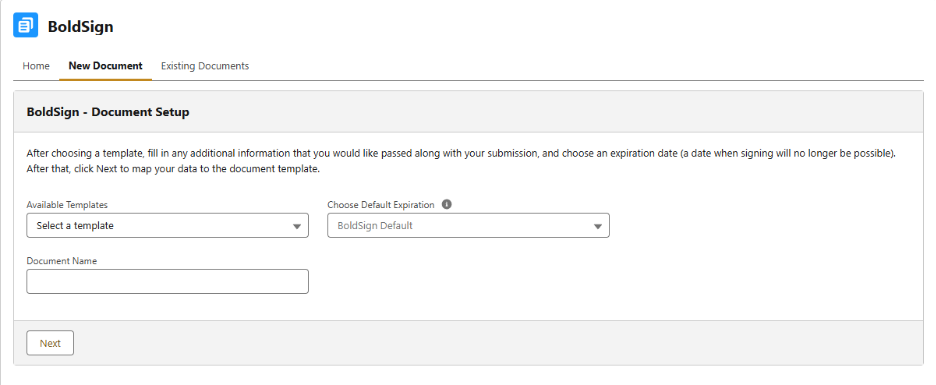
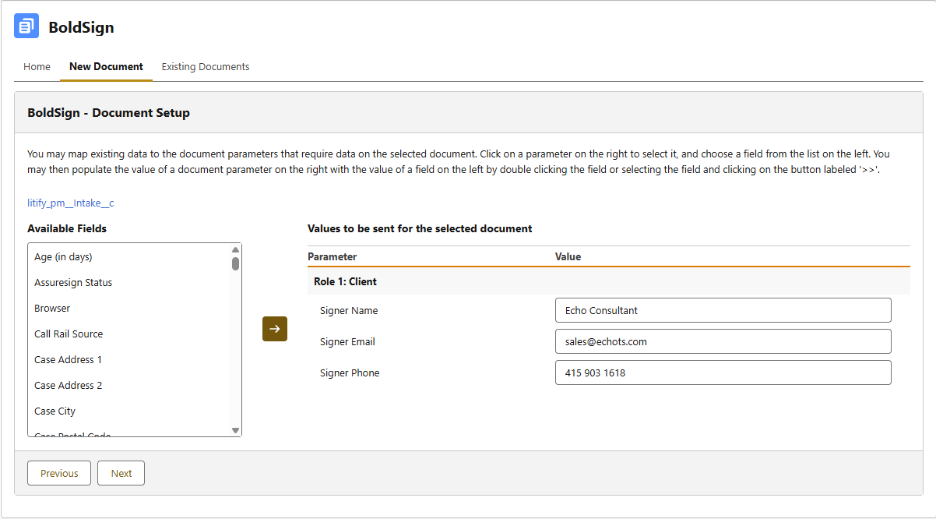
After moving on to the next screen, the user is able to adjust parameter values sent to the document template. They can be entered manually, or the user is presented with available fields from the object they are viewing the component from as well as the fields on all related objects.
The final screen presents the user with the option to review all field mappings before submitting and sending the email to the client.
The Existing Documents tab allows users to view all previously sent documents related to the record they are viewing. Selecting a document opens the original template that was used. For documents that were started or completed, the user can also view the finished version with all fields filled in and signatures applied.
Finally, the user is able to download the audit trail for the selected document.
User Experience Enhancements
The new component has been redesigned to align with the Salesforce Lightning Design System.
The new layout is cleaner, with fewer fields (unused fields from the previous component were removed to keep it looking uncluttered and more intuitive).
Technical Improvements
The new component gives much more control for further enhancements and reusability across other objects thanks to its API-first architecture. Any issues can be resolved directly by the ECHO team, without depending on a third-party vendor.
The users do not need to log in to external systems anymore, reducing the number of steps required to download the audit trail significantly.
Results
The transition from AssureSign to the new BoldSign-powered component delivered on both goals of the project. Staff were able to continue working exactly as before – same layout, same behavior – with no retraining required. The change was intentionally seamless, and for most users, the switch went unnoticed in the best possible way.
The most immediate practical improvement was the audit trail. What previously required logging into a separate system is now available directly within Salesforce, reducing a multi-step process to a single click. For a team handling retainer agreements daily, that's time saved on every single case.
Beyond the user-facing improvements, the new component is built with flexibility in mind. Unlike the previous integration, it can be extended to other objects without starting from scratch.
Working with a similar integration challenge? We'd be happy to talk through your options. Reach out to us at Book a Call.
Ready to transform your Litify experience?
Other case studies



Transform What’s Possible With
Salesforce
Traction Rec
Litify
Salesforce
Unlock the full potential of your platforms and make the impossible a reality with ECHO Technology Solutions.


%201%20(1).svg)