Automating Trainer Calendar Invitations from Salesforce

Introduction
Our client is a California nonprofit that runs a program of trainer-led workshops and manages it in Salesforce. Each workshop is stored as a Workshop record, and the trainers who deliver it are linked through Workshop Staff records. Salesforce was the single source of truth for who was teaching which session and when, but it was not where trainers plan their time.
The two systems were not connected, so trainers did not receive calendar invitations for the workshops they were assigned to. Assignments, schedule changes and removals were recorded in Salesforce but never reached their calendars, which made it easy to miss a session or a change. The client asked ECHO to close this gap by connecting Salesforce directly to Google Calendar.
Mission
Our mission was to make sure every trainer always has an accurate view of their workshops in their own calendar, driven automatically by the assignments the client already manages in Salesforce.
The solution had to:
- Send a calendar invitation for the scheduled date and time whenever a trainer is assigned to a workshop.
- Update the existing invitations when a workshop's date or time changes, so every assigned trainer sees the new details.
- Cancel the invitation and notify the trainer when they are unassigned, rather than leaving an outdated entry on their calendar.
- Work automatically in the background, with no extra steps for the client's team and no change to how they manage workshops in Salesforce.
- Be reliable and easy for the client to maintain and support over time.
Solution
We built a native Salesforce integration with the Google Calendar API that reacts to changes in trainer assignments and workshop schedules. It runs entirely inside Salesforce, with no middleware or third-party connector for the client to license or maintain.
Here's how it is structured:
- Trigger handler — Responds to assignment and schedule changes on Workshop and Workshop Staff objects, creates the matching Salesforce Event, and hands the calendar work to a background job.
- Queueable apex job — Runs the create, update and cancel operations. Salesforce does not allow callouts after uncommitted record changes in the same transaction, so the calls to Google must run separately. This also keeps saving records fast.
- Service layer — Builds the event payloads, sends requests to the Google Calendar API, processes the responses and writes the Google Event ID back to Salesforce.
- Selectors — Data queries are kept in reusable selector classes, making the code easier to maintain and test.
- Unit tests — Cover both success and failure paths, using an HttpCalloutMock class that simulates Google Calendar API responses.
- Logging — A central exception logger records authentication failures, API errors, invalid credentials and unexpected exceptions for troubleshooting.
- Retry logic — Runs once at the end of every day, picks up any events from that day that failed to sync to trainers’ calendars, and retries them.
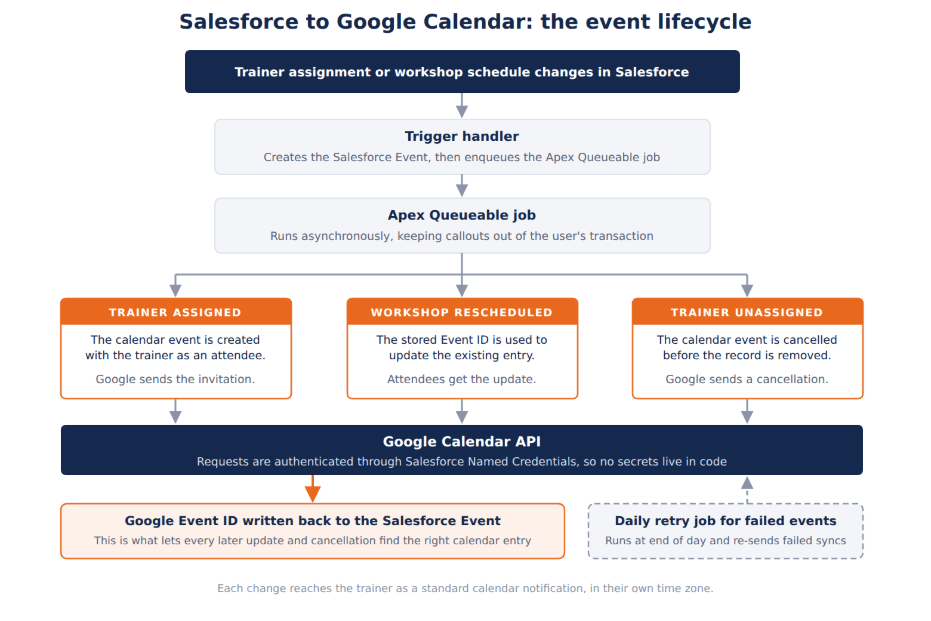
How the event lifecycle works:
- On assignment, a Salesforce Event is created, and the background job creates the matching event on a dedicated workshop calendar account and adds the trainer as a guest. Google sends the invitation, and the Google Event ID is stored in Salesforce.
- On reschedule, the stored Google Event ID is used to update the existing calendar events, and each trainer gets an updated invitation.
- On unassignment, the Google event is cancelled first, and Google sends the trainer a cancellation notice, so the entry does not silently disappear. Only then is the Salesforce Event removed.
Authentication and configuration:
- Google OAuth 2.0 is handled through Salesforce Auth Providers, External Credentials and Named Credentials, so Salesforce manages and refreshes access tokens automatically and no secrets are stored in code.
- A dedicated Google Cloud project has the Google Calendar API enabled, with separate OAuth clients for Production and Sandbox.
Results
Trainers now see their workshop assignments where they actually plan their time, kept up to date automatically from Salesforce.
What the client gained:
- Trainers receive invitations, updates and cancellations automatically, with no extra steps for the client's team.
- Every assignment is linked to its Google event through the stored Event ID, so every later update or cancellation reaches the right calendar entry.
- Each change arrives as a standard calendar notification in the trainer's own time zone.
- Because the Google Calendar API is called in the background, saving a record never waits on a response from Google.
Running a program where the schedule lives in Salesforce but the people who deliver it do not? ECHO has built 100+ integrations across Salesforce, Traction Rec and Litify. Let’s talk through your options.
Reach out to us at https://www.echots.com/schedule-a-call.
Ready to transform your Salesforce experience?
Other case studies



Transform What’s Possible With
Salesforce
Traction Rec
Litify
Salesforce
Unlock the full potential of your platforms and make the impossible a reality with ECHO Technology Solutions.


